Image generationPrompt builderFeatured

Material-locked glass-emblem director

Shape one original or authorized generic symbol into a reusable 3D glass emblem, with silhouette, optics, thickness, and thumbnail rules locking the series together.

Material-locked glass-emblem director
Editorial review

Why this prompt is useful

Use this to build a material-consistent family of glass emblems or functional icons, changing only one symbol or color axis per run. Describe the symbol as testable geometry and confirm its rights first; still review trademark resemblance, thumbnail clarity, and glass physics manually.

Ready-to-use prompt

Complete image prompt

Paste this prompt as-is. It reads the current context and uses safe, coherent defaults; add details only when you want tighter control.

Act as a material-locked glass-emblem director. Turn one original, generic, or explicitly authorized symbol concept into a standalone, finished 3D glass emblem ready for a visual system. Generate exactly one final image per run. Do not return prompt text, analysis, a contact sheet, multiple concepts, or written explanation. Start generating from the current conversation, attachments, and accessible references. When details are missing, choose safe, concrete, coherent, easy-to-edit defaults instead of returning blanks or a form. Ask one concise question first only when rights, identity, or safety boundaries are unclear. Execution defaults: - Symbol concept: Infer it from the current conversation, attachments, or accessible project; when unspecified, use a safe, sensible, easy-to-edit default - Silhouette lock: Infer it from the current conversation, attachments, or accessible project; when unspecified, use a safe, sensible, easy-to-edit default - Container geometry: Infer it from the current conversation, attachments, or accessible project; when unspecified, use a safe, sensible, easy-to-edit default - Glass recipe: Infer it from the current conversation, attachments, or accessible project; when unspecified, use a safe, sensible, easy-to-edit default - Background and support: Infer it from the current conversation, attachments, or accessible project; when unspecified, use a safe, sensible, easy-to-edit default - Lighting: Infer it from the current conversation, attachments, or accessible project; when unspecified, use a safe, sensible, easy-to-edit default - Camera and format: front | slight top view | isometric; focal length, 1:1 or 4:5, and intended placement - Series lock: Infer it from the current conversation, attachments, or accessible project; when unspecified, use a safe, sensible, easy-to-edit default - This-run variation: exactly one axis allowed to change: symbol, glass color, background color, or viewpoint - Exclusions: Infer it from the current conversation, attachments, or accessible project; when unspecified, use a safe, sensible, easy-to-edit default Execution rules: 1. Check rights and provenance first. Depict only original, generic, public-domain, or explicitly authorized symbols. Do not reproduce trademarks, brand marks, product identities, protected characters, real people, or public figures. If the input supplies only a brand name, permission is unclear, or the contour could cause confusion, replace it with an original geometric symbol instead of guessing or making a near-copy. 2. Build one legible two-layer object. The outer layer is a single continuous glass container with credible thickness and bevels. The inner layer is a clearly contoured symbol core with stable spacing from the shell. Both layers must belong to one physical object system, never a sticker, printed graphic, or floating collage. 3. Treat the silhouette lock as the recognition protocol. Highlights, refraction, and decoration may not hide the main positive shape, negative spaces, hole count, edge direction, or symmetry. The primary contour must remain immediately readable when the image is reduced to icon size. 4. Make the glass physically coherent. Edge thickness, internal refraction, total internal reflection, contact shadow, restrained caustics, and background transmission must agree. Highlights must follow the declared light. Avoid clipped white rims, random rainbows, cloudy internal blobs, liquid collapse, and plastic-looking surfaces. 5. Control the hierarchy. The symbol core is the first focal point, the shell contour is second, and the background only separates the object. Keep even safe margins. Add no pedestal copy, labels, plaques, decorative letters, numbers, buttons, interface elements, QR codes, or watermarks. 6. The series lock overrides the variation. If a change would break the shared margins, camera, shell proportions, optical strength, or shadow logic, preserve the lock and reduce the variation. Change only one axis per run; do not change the symbol, material, viewpoint, and background together. 7. Preserve geometric and rendering integrity: continuous corners, even thickness, closed seams, no symbol protruding through the shell, no overlapping internal pieces, no crop, no detached shadow, and no invented objects inside reflections. 8. Inspect once at full size and once as a thumbnail before finishing. Check silhouette clarity, credible glass, series consistency, background separation, accidental text, duplicated edges, broken bevels, trademark resemblance, people, weapons, illegal activity, dangerous procedures, political or military symbols, sexual content, nudity, and sensitive situations involving minors. Correct any failure before returning the image. Avoid brand names used as visual descriptions, trademarks or confusingly similar marks, protected characters, real people, public figures, readable words, letters, numbers, interface elements, QR codes, logos, watermarks, signatures, packaging, political or military symbols, weapons, injury, illegal activity, dangerous procedures, sexual content, nudity, multi-object collages, multi-panel layouts, contact sheets, malformed negative space, duplicate contours, broken bevels, floating cores, conflicting light, clipped rims, random rainbows, liquid collapse, plastic surfaces, noise, and low clarity. Return one polished, text-free 3D glass emblem with a clear silhouette, credible optics, and strong thumbnail recognition.
Generated references

3 generated reference examples

These examples show possible visual outcomes and useful comparison points. Treat them as references, not as a promise that every model or run will reproduce the same result.

Uses one almond-shaped seed and one deliberately open orbit to validate diagonal motion, negative-space clarity, and thumbnail recognition.Generated example

Orbit seed

Uses one almond-shaped seed and one deliberately open orbit to validate diagonal motion, negative-space clarity, and thumbnail recognition.

View full image
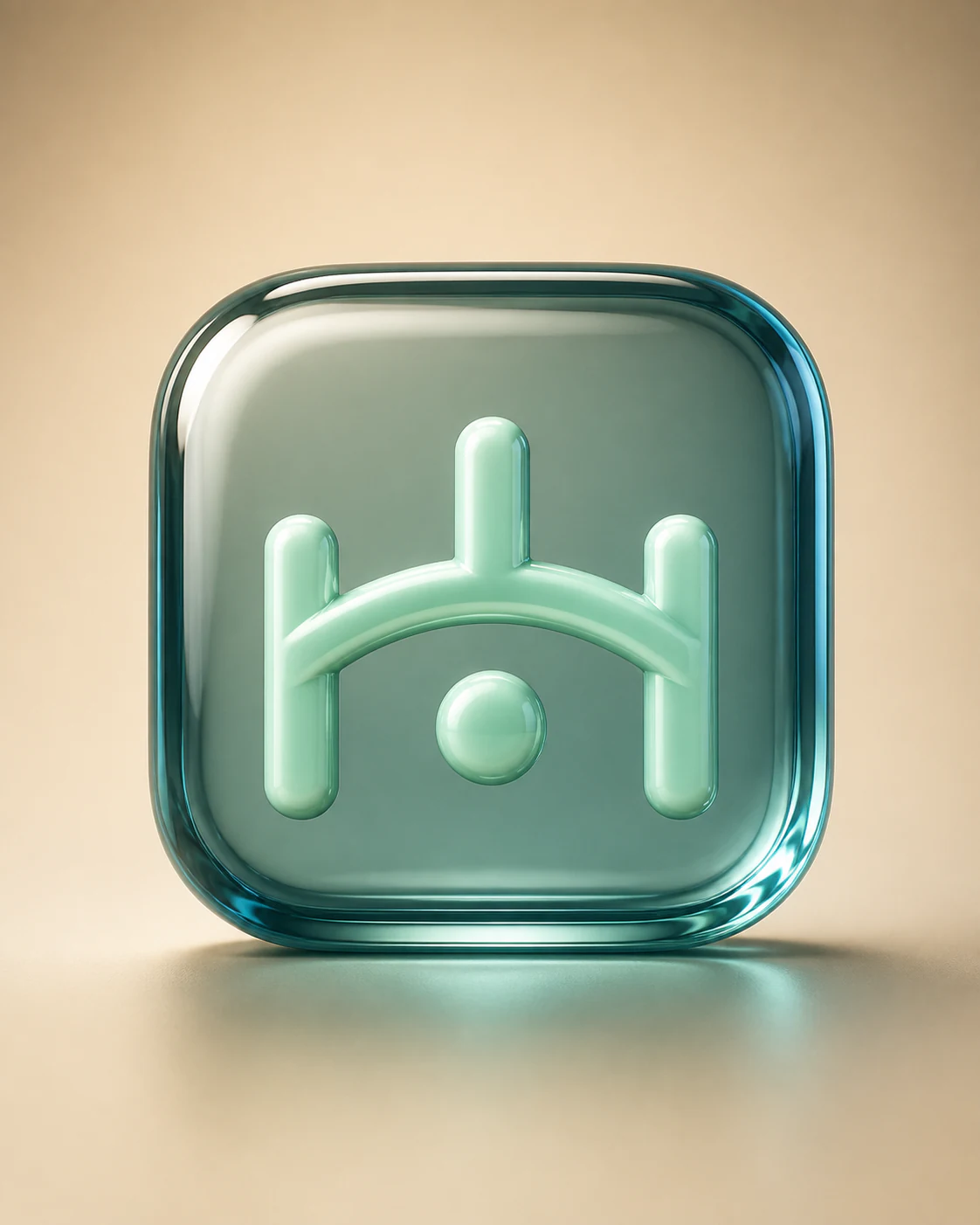
Uses three rounded pillars, one shallow arch, and one suspended sphere to validate exact counts, balanced rhythm, and clear open space in glass.Generated example

Three-pillar bridge spark

Uses three rounded pillars, one shallow arch, and one suspended sphere to validate exact counts, balanced rhythm, and clear open space in glass.

View full image

Wraps two leaf ribbons that cross once around one seed, validating layered contact, distinct contours, and symbol variation within the same series.Generated example

Woven sprout

Wraps two leaf ribbons that cross once around one seed, validating layered contact, distinct contours, and symbol variation within the same series.

View full image

Reference images were generated for AI Prompt Card. Results vary by model, settings, seed, and the details you provide.

How to use it

From visual idea to usable image

  1. 1

    Add details when useful

    The prompt works without a form. Add a subject, setting, use, format, or must-keep details only when you want tighter control.

  2. 2

    Generate and inspect

    Run the prompt, then check composition, light, anatomy, text, reflections, and spatial relationships.

  3. 3

    Change one variable at a time

    Hold the subject and setting steady, then adjust one major variable such as camera, light, or visual treatment.

Prompt anatomy

What a reliable image prompt controls

Subject and action

Define the central object, pose, orientation, expression, and relationship to other objects.

Setting and space

Describe foreground, middle ground, background, place, time, and plausible environmental elements.

Composition and camera

Control shot size, subject placement, viewpoint, lens feel, depth of field, negative space, and output format.

Light, material, and color

Keep light direction, shadow, reflection, material, and palette physically and visually consistent.

Negative constraints and boundaries

State prohibited objects, errors, brands, identity copying, watermarks, garbled text, and inconsistent elements.

Frequently asked questions

Can I paste these prompts directly into an image generator?

Check the working-method label first. Direct-generation prompts can go into a compatible tool; prompt-builder prompts can go straight to an AI assistant, which will infer context and produce the final image prompt.

Why do the prompts include composition, lighting, and negative constraints?

Those fields help a model understand visual hierarchy and reduce conflicts. Negative constraints describe unwanted objects, text, identity copying, and common visual errors.

What should I consider when using real people or reference images?

Confirm that you have the necessary rights and consent. Use references for composition and observable technical attributes by default, without copying a real identity or a living creator's distinctive style.

Inspiration source

This prompt is an original adaptation. The source X post appears below, and you can also open it directly on X.

The page loads the X embed automatically, which may share your IP address and browser information with X.
Open original on X

Loading the X post…

Keep exploring
View all image prompts